BIQU Power Management Module for 3D Printers
BIQU Power Management Module for 3D Printers
Couldn't load pickup availability


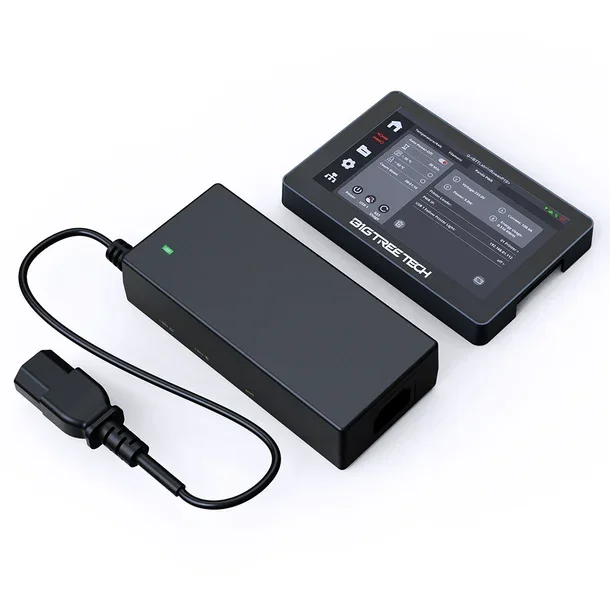
The BIGTREETECH Panda PWR It's an advanced intelligent power management module designed to optimize the energy management of 3D printers. This versatile device offers real-time monitoring, wireless remote control, and auto-shutdown functions, making it ideal for both beginners and experienced users looking to improve the energy efficiency and safety of their 3D printers.

Main Features
Wireless Remote Control
The Panda PWR allows you to manage your 3D printer via a local area network (LAN), allowing you to monitor and control parameters such as voltage, power, and energy consumption directly from your smartphone or PC. No technical experience is required: simply connect to the network and access the intuitive web interface.
Programmable Automatic Shut-Off
The timer function allows you to set the printer to automatically shut down when printing is complete, with customizable settings for the countdown time and temperature limits. This function is available in both online and offline modes, ensuring energy efficiency and operational safety.
Multi-Printer Management
By equipping each printer with a Panda PWR module, you can manage up to 10 printers simultaneously using a single BIGTREETECH Panda Touch (Requires firmware V1.0.5 or higher.) This solution significantly increases the efficiency of managing 3D printer farms.
Dual Smart USB Ports

Real-Time Energy Monitoring
The Panda PWR constantly records and displays energy consumption data, allowing you to optimize operating costs and track the energy used for each print job.
Over-The-Air (OTA) Updates
The device supports wireless firmware updates, ensuring access to the latest features and enhancements without the need for physical connections.
Operating Modes
Standalone LAN Mode
Use the Panda PWR as a standalone device, controllable via the web interface from any device connected to the same local network. The blue LED indicator indicates operation in this mode.
Panda Touch Mode
Connect the Panda PWR to the Panda Touch touchscreen display for integrated, visual control of power settings directly on the printer. The green LED indicator indicates active communication with the Panda Touch.
Extended Compatibility
The Panda PWR is compatible with a wide range of FDM 3D printers using Klipper firmware, including the most popular models on the market:
- Bambu Lab : A1, A1 mini, P1P, P1S, X1, X1C, X1E
- Creality : Ender 3 (Pro, V2, Neo, V2 Neo, Max, V3, V3 SE), Ender 3 S1 (Standard, Pro, Plus), Ender 5 (Plus, S1), Ender 7, K1 series
- Anycubic : Kobra Series
- Other 3D printers with IEC-C14 connector and 100-240VAC input voltage
Complete Technical Specifications
| Characteristic | Specification |
|---|---|
| Microcontroller | ESP8684-MINI-1-H4 |
| Memory | RAM: 272KB, Flash: 4MB |
| Wi-Fi connectivity | 2.4GHz (IEEE 802.11 b/g/n) |
| IEC-C14 Input Voltage | 100VAC ~ 240VAC |
| IEC-C13 Output Voltage | 100VAC ~ 220VAC |
| Rated Load Current | 9A (maximum) |
| Type-C Input Voltage | 5V |
| Maximum USB Current | 1.5A + 1.5A (USB1 + USB2) |
| PC Interface | Type-C |
| Dimensions | 141.66 x 65.66 x 34.5 mm |
| Cable Length | 500 mm |
| Operating Temperature | -10°C ~ 60°C |
| Heat Dissipation | Made of copper |
| Certifications | FCC Part 15, Class B |
| Warranty | 1 year (parts and labor) |
Package Contents
Complete Web Interface
The web interface allows you to view real-time power parameters, configure Wi-Fi settings, manage the automatic shutdown countdown, control USB ports, update the firmware via OTA and restore factory settings.
Multifunction Bind Button
- Long press (3 seconds) : activates binding mode to connect the Panda Touch
- Double click : activates the 220V power supply
- Long press (8 seconds) : factory reset
Intelligent LED Indicators
- Blue : Standalone LAN mode
- Blue button : Searching for Panda Touch device for binding
- Green : Normal communication with Panda Touch
- Flashing green : Communication error with Panda Touch
- Red button : Factory reset in progress
Benefits for Your Laboratory
The Panda PWR transforms 3D printer power management into a smart, connected system, offering energy savings through automatic shutdown, reduced operating costs thanks to precise consumption monitoring, increased safety with integrated protections, remote control to monitor printers from anywhere, and scalability to manage multiple printers from a single interface.
Easy Installation
The Panda PWR is designed for plug-and-play installation without requiring advanced technical skills. Simply plug in the IEC-C14 power cable, connect the device to your Wi-Fi network following the wizard, and start controlling the printer via a mobile app, web browser, or Panda Touch.
Important Note : When connecting the 220VAC input, first connect the cables to the Panda PWR and then to the power outlet. The TYPE-C port can only be used as an input, while the USB-A ports can only be used as an output.
The BIGTREETECH Panda PWR It represents the ideal solution for those who want to modernize their 3D printer with smart energy management features, ensuring efficiency, safety and complete power control.
Shipping and Warranty
Shipping and Warranty
All products available in stock will be delivered with an average timing of 24/48 hours.
Italy warranty with dedicated consulting support, contact us!