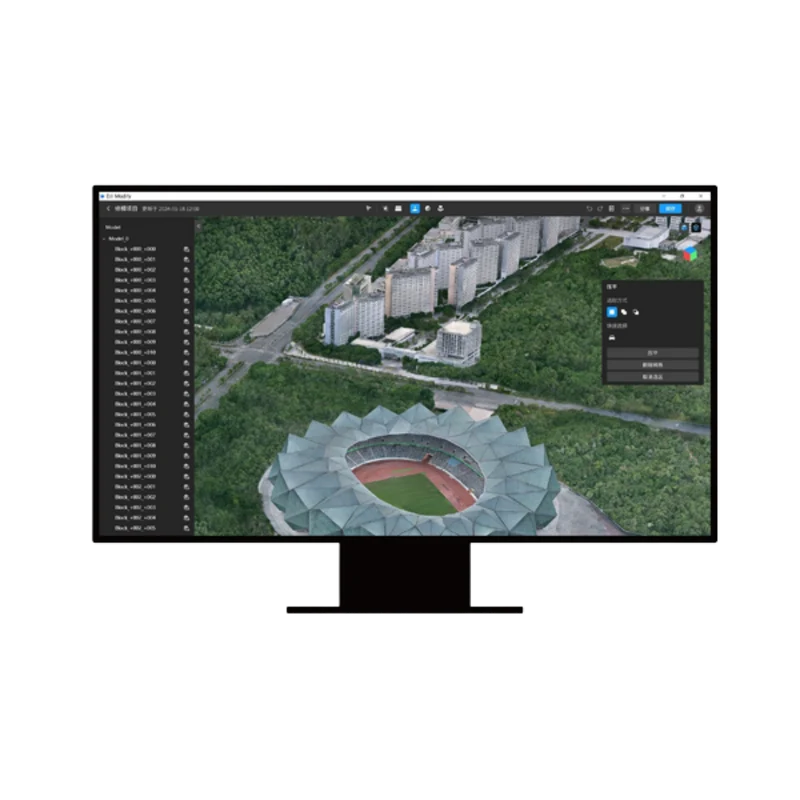
DJI Terra Pro + Modifier Permanent 1 appareil
DJI Terra Pro + Modifier Permanent 1 appareil
Impossible de charger la disponibilité du service de retrait


DJI Modify – Flagship Edition (Permanente / 1 An)
Le premier logiciel DJI dédié à l'édition et au nettoyage avancé de modèles 3D.
DJI Modify est le logiciel de retouche 3D et de modélisation intelligente conçu par DJI pour s'intégrer parfaitement à DJI Terra. Doté d'une interface intuitive et d'outils basés sur des algorithmes d'IA, DJI Modify élimine les complexités de l'édition 3D traditionnelle, permettant d'identifier et de corriger rapidement les défauts courants des maillages photogrammétriques et des nuages de points : remplissage de trous, nivellement des surfaces d'eau, réparation de parties manquantes et suppression de véhicules ou d'éléments indésirables
Choisissez la formule de licence qui vous convient le mieux
DJI Modify Flagship Edition est disponible en deux options de licence pour s'adapter à chaque besoin opérationnel et budgétaire :
- Licence permanente (Permanent) : Achat ponctuel avec une licence d'utilisation à durée indéterminée. C'est la solution idéale pour ceux qui recherchent une stabilité opérationnelle à long terme sans frais ou renouvellements périodiques (inclut l'accès aux mises à jour logicielles pour la première année).
- Abonnement annuel (1 Year Subscription) : Licence temporaire d'une durée de 12 mois. Solution flexible qui inclut un accès continu aux dernières mises à jour logicielles, de nouvelles fonctionnalités et un support technique pendant toute la durée de l'abonnement.
Pourquoi ajouter DJI Modify à votre flux de travail ?
- Intégration native avec DJI Terra : Passage direct à DJI Modify en un seul clic pour le nettoyage du modèle 3D généré dans Terra, en réexportant les données prêtes pour la livraison finale
- Correction automatique par IA : Reconnaissance et élimination rapide des artefacts visuels, tels que les voitures en mouvement, les ombres incorrectes, les trous dans la surface ou les irrégularités dans les plans d'eau
- Édition simple et rapide : Interface conçue spécifiquement pour les géomètres et les modélisateurs 3D qui ne nécessite pas de compétences en logiciels CAO ou d'animation complexes.
- Gestion et modification par lots : Importation/exportation rapide et traitement simultané pour une gestion optimisée de plusieurs modèles.
Fonctionnalités principales d'édition 3D
- Réparation des surfaces aquatiques (Water Surface Repair) : Identifie et nivelle automatiquement les rivières, les lacs et les plans d'eau, en corrigeant l'effet de « frisure » typique des reconstructions photogrammétriques.
- Suppression d'objets et de véhicules : Supprimez rapidement les voitures, les piétons ou les structures flottantes du modèle avec une reconstruction automatique des textures sous-jacentes.
- Remplissage de trous et réparation de maillage (Hole Filling) : Détecte et élimine les vides visuels ou les zones d'ombre dans le maillage (ex. sous les toits ou les ponts) en recréant la géométrie de manière naturelle.
- Aplatissement de surfaces (Flattening) : Nivelez les trottoirs, les cours, les terrains et les toits des bâtiments avec des outils de sélection polygonale de haute précision.
- Édition de nuages de points : Lissage, réduction du bruit, sous-échantillonnage et classification automatique des catégories en un seul clic.
- Exportation multi-format : Prise en charge d'une large compatibilité pour les maillages (PLY, OBJ, B3DM, etc.) et les nuages de points (LAS, PNTS, PLY, PCD, S3MB) prêts pour l'intégration dans des systèmes SIG, des contextes BIM ou des plateformes web 3D.
Applications sectorielles
- Ingénierie et urbanisme : Présentations photoréalistes et épurées de chantiers, quartiers et infrastructures sans éléments perturbateurs.
- Relevés architecturaux et topographie : Finition de modèles 3D pour des livrables techniques précis et exempts d'erreurs géométriques.
- Gestion des urgences et sécurité : Création rapide de jumeaux numériques (Digital Twins) propres pour l'analyse de scénarios et les simulations opérationnelles.
Configuration matérielle recommandée
Pour garantir une édition fluide des maillages 3D et des nuages de points haute résolution :
| Composant | Configuration minimale | Configuration recommandée (projets complexes) |
| Système d'exploitation | Windows 10/11 64 bits | Windows 10/11 64 bits |
| Carte graphique (GPU) | NVIDIA (6 Go VRAM minimum, CUDA 6.1+) | NVIDIA RTX 3070 / 4070 (8–12 Go VRAM) |
| Mémoire RAM | 32 Go | 64 Go |
| Processeur (CPU) | Intel Core i5 / i7 | Intel Core i7 / i9 ou AMD Ryzen 7 / 9 |
| Stockage | SSD avec 100 Go libres | SSD NVMe M.2 de 1 To |
⚠️ Notes importantes :
- Comme pour la suite DJI Terra, les fonctions de rendu et de modification 3D de DJI Modify nécessitent obligatoirement des cartes graphiques NVIDIA dotées de l'architecture CUDA®. Les cartes AMD et les GPU intégrés ne sont pas pris en charge.
- Le logiciel nécessite une connexion Internet active pour la licence et le fonctionnement en ligne
- Chaque licence est liée à un compte DJI unique et ne peut être activée que sur un seul poste/appareil
Expédition et Garantie
Expédition et Garantie
Tous les produits disponibles en stock seront livrés dans un délai moyen de 24/48 heures.
Garantie Italie avec support de conseil dédié, contactez-nous !