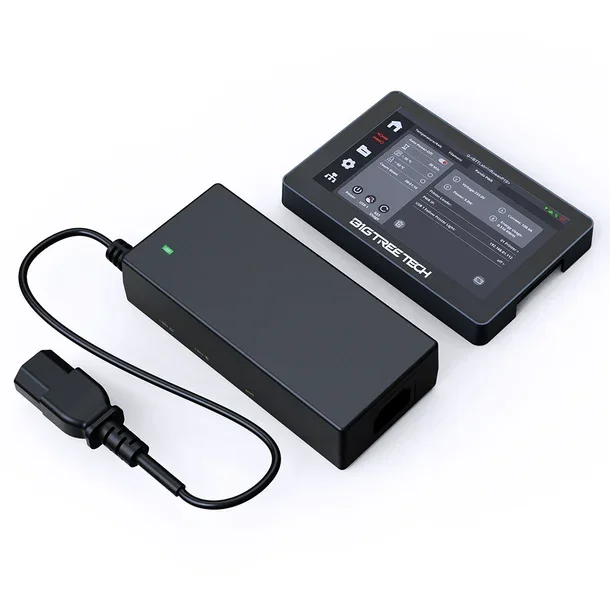
Module de gestion de l'alimentation BIQU pour imprimantes 3D
Module de gestion de l'alimentation BIQU pour imprimantes 3D
Impossible de charger la disponibilité du service de retrait


Le BIGTREETECH Panda PWR est un module avancé de gestion intelligente de l'alimentation conçu pour optimiser le contrôle énergétique des imprimantes 3D. Ce dispositif polyvalent offre une surveillance en temps réel, un contrôle sans fil à distance et des fonctions d'arrêt automatique, le rendant idéal aussi bien pour les débutants que pour les utilisateurs expérimentés souhaitant améliorer l'efficacité énergétique et la sécurité de leurs imprimantes 3D.

Caractéristiques principales
Contrôle sans fil à distance
Le Panda PWR permet de gérer l'imprimante 3D via un réseau local (LAN), autorisant la surveillance et le contrôle de paramètres tels que la tension, la puissance et la consommation énergétique directement depuis un smartphone ou un PC. Aucune expérience technique n'est nécessaire : il suffit de se connecter au réseau et d'accéder à l'interface web intuitive.
Arrêt automatique programmable
La fonction de minuterie permet de définir l'arrêt automatique de l'imprimante à la fin de l'impression, avec des paramètres personnalisables pour la durée du compte à rebours et les seuils de température. Cette fonction est disponible en mode en ligne comme hors ligne, garantissant efficacité énergétique et sécurité opérationnelle.
Gestion multi-imprimante
En équipant chaque imprimante d'un module Panda PWR, il est possible de gérer jusqu'à 10 imprimantes simultanément en utilisant un seul BIGTREETECH Panda Touch (nécessite le micrologiciel V1.0.5 ou supérieur). Cette solution augmente considérablement l'efficacité de la gestion des fermes d'imprimantes 3D.
Double port USB intelligent

Surveillance énergétique en temps réel
Le Panda PWR enregistre et affiche en permanence les données de consommation énergétique, permettant d'optimiser les coûts opérationnels et de suivre l'énergie utilisée pour chaque travail d'impression.
Mises à jour Over-The-Air (OTA)
Le dispositif prend en charge les mises à jour sans fil du micrologiciel, garantissant l'accès aux dernières fonctionnalités et améliorations sans nécessiter de connexions physiques.
Modes de fonctionnement
Mode LAN autonome
Utilisez le Panda PWR comme appareil autonome, contrôlable via l'interface web depuis n'importe quel appareil connecté au même réseau local. L'indicateur LED bleu signale le fonctionnement dans ce mode.
Mode Panda Touch
Connectez le Panda PWR à l'écran tactile Panda Touch pour un contrôle intégré et visuel des paramètres d'alimentation directement sur l'imprimante. L'indicateur LED vert signale la communication active avec le Panda Touch.
Compatibilité étendue
Le Panda PWR est compatible avec une large gamme d'imprimantes 3D FDM utilisant le micrologiciel Klipper, incluant les modèles les plus répandus sur le marché :
- Bambu Lab : A1, A1 mini, P1P, P1S, X1, X1C, X1E
- Creality : Ender 3 (Pro, V2, Neo, V2 Neo, Max, V3, V3 SE), Ender 3 S1 (Standard, Pro, Plus), Ender 5 (Plus, S1), Ender 7, série K1
- Anycubic : Série Kobra
- Autres imprimantes 3D avec connecteur IEC-C14 et tension d'entrée 100-240VAC
Spécifications techniques complètes
| Caractéristique | Spécification |
|---|---|
| Microcontrôleur | ESP8684-MINI-1-H4 |
| Mémoire | RAM : 272Ko, Flash : 4Mo |
| Connectivité Wi-Fi | 2.4GHz (IEEE 802.11 b/g/n) |
| Tension d'entrée IEC-C14 | 100VAC ~ 240VAC |
| Tension de sortie IEC-C13 | 100VAC ~ 220VAC |
| Courant nominal de charge | 9A (maximum) |
| Tension d'entrée Type-C | 5V |
| Courant maximal USB | 1.5A + 1.5A (USB1 + USB2) |
| Interface PC | Type-C |
| Dimensions | 141.66 x 65.66 x 34.5 mm |
| Longueur du câble | 500 mm |
| Température de fonctionnement | -10°C ~ 60°C |
| Dissipation thermique | Fabriquée en cuivre |
| Certifications | FCC Partie 15, Classe B |
| Garantie | 1 an (pièces et main-d'œuvre) |
Contenu de l'emballage
Interface web complète
L'interface web permet de visualiser les paramètres d'alimentation en temps réel, de configurer les réglages Wi-Fi, de gérer le compte à rebours pour l'arrêt automatique, de contrôler les ports USB, de mettre à jour le micrologiciel via OTA et de rétablir les paramètres d'usine.
Bouton Bind multifonction
- Appui long (3 secondes) : active le mode de liaison pour connecter le Panda Touch
- Double clic : active l'alimentation 220V
- Appui prolongé (8 secondes) : rétablissement des paramètres d'usine
Indicateurs LED intelligents
- Bleu : mode LAN autonome
- Bleu clignotant : recherche du périphérique Panda Touch pour la liaison
- Vert : communication normale avec le Panda Touch
- Vert clignotant : erreur de communication avec le Panda Touch
- Rouge clignotant : réinitialisation d'usine en cours
Avantages pour votre atelier
Le Panda PWR transforme la gestion énergétique des imprimantes 3D en un système intelligent et connecté, offrant des économies d'énergie grâce à l'arrêt automatique, une réduction des coûts opérationnels grâce à un suivi précis de la consommation, une sécurité accrue avec des protections intégrées, un contrôle à distance pour surveiller les imprimantes depuis n'importe quel endroit, et une évolutivité pour gérer plusieurs imprimantes à partir d'une interface unique.
Installation simple
Le Panda PWR est conçu pour une installation plug-and-play sans nécessiter de compétences techniques avancées. Il suffit de brancher le câble d'alimentation IEC-C14, de connecter le périphérique au réseau Wi-Fi en suivant la procédure guidée, et de commencer à contrôler l'imprimante via l'application mobile, le navigateur web ou le Panda Touch.
Note importante : lors du branchement de l'entrée 220VAC, connectez d'abord les câbles au Panda PWR, puis à la prise de courant. Le port TYPE-C ne peut être utilisé que comme entrée, tandis que les ports USB-A servent uniquement de sortie.
Le BIGTREETECH Panda PWR représente la solution idéale pour ceux qui souhaitent moderniser leur imprimante 3D avec des fonctionnalités intelligentes de gestion énergétique, garantissant efficacité, sécurité et un contrôle total de l'alimentation.
Expédition et Garantie
Expédition et Garantie
Tous les produits disponibles en stock seront livrés dans un délai moyen de 24/48 heures.
Garantie Italie avec support de conseil dédié, contactez-nous !