Mosaic Print Head PHLT (Low Temperature)
Mosaic Print Head PHLT (Low Temperature)
Couldn't load pickup availability


Mosaic Print Head PHLT - Low Temperature 0.4mm | Element/Element HT compatible
Main Description
There Print Head PHLT This is Mosaic Manufacturing's low-temperature extruder head, designed specifically for the Element multi-material 3D printer. This modular component enables high-quality printing with a wide range of standard thermoplastic materials, making it ideal for rapid prototyping, short-run production, and tooling applications.
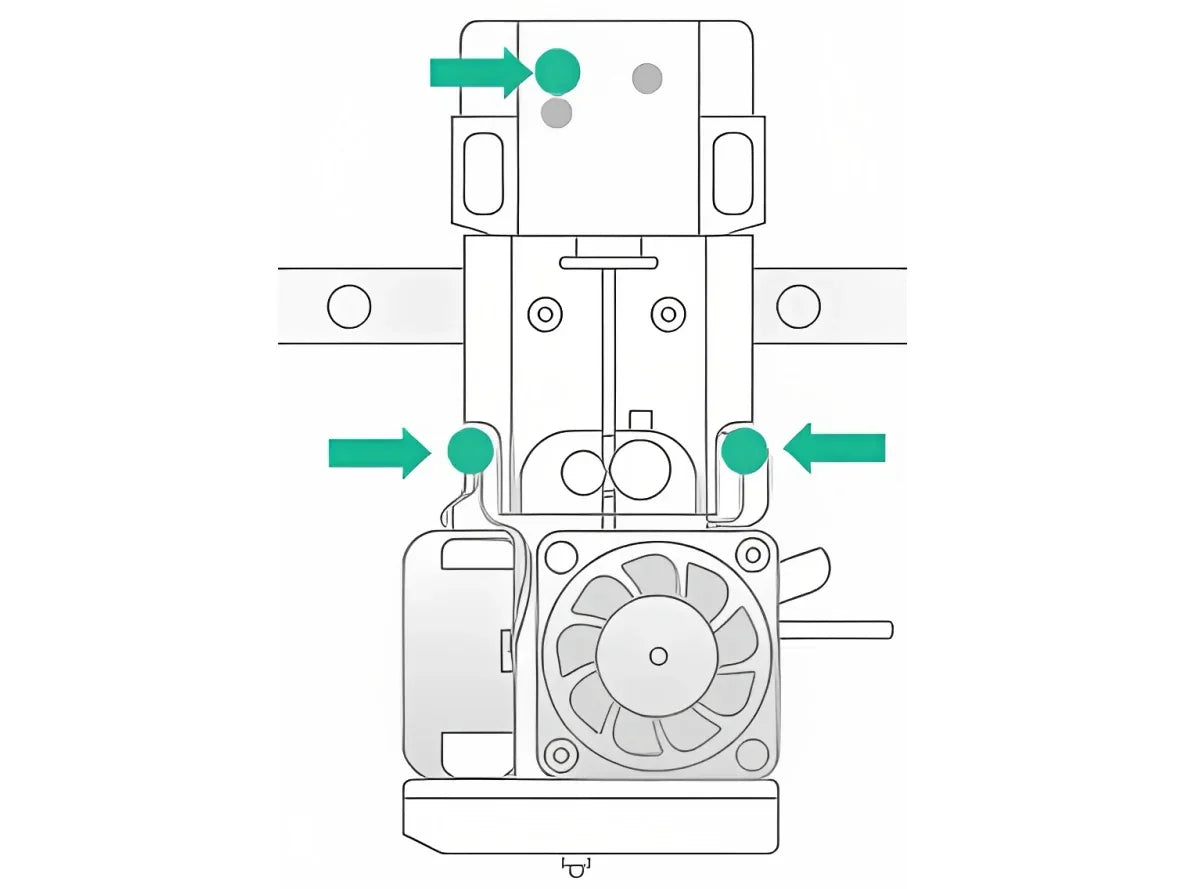
The PHLT head is characterized by a modular and kinetic design which makes it easy to remove and reinstall in less than 60 seconds without the need for special tools. This feature makes maintenance, cleaning, and replacement particularly easy when necessary.
Main Features:
- Kinetic coupling modular head : Removable and reinstallable in less than 60 seconds
- 0.4mm hardened steel nozzle : Guaranteed durability and precision
- Built-in cooling fans : Essential for printing low-temperature materials
- Magnetic Positioning : Automatic centering system for precise alignment
- POGO connectors on the back : Reliable electrical interface
- Ergonomic design with 3 screws feeling : Stable and reversible fixing
- Universal Element Compatibility : Works on Element and Element HT
When to Choose PHLT:
Use the PHLT Print Head to print standard and semi-engineered materials that do not require extrusion temperatures above 300°C. It is the best choice for most low- to medium-temperature prototyping and production applications.
Technical Specifications Table
| Parameter | Value |
|---|---|
| Model | PHLT |
| Mosaic Product Code | SW10913 |
| Type | Low Temperature (LT) |
| Nozzle Diameter | 0.4 mm |
| Nozzle Material | Hardened steel |
| Maximum Hotend Temperature | 300°C |
| Maximum Temperature of the Heated Plate | 120°C |
| Maximum Room Temperature | 90°C |
| Layer Resolution | 20-320 microns |
| Max Print Speed | 100 mm/s |
| Removal/Installation Time | < 60 seconds (without tools) |
| Fixing | 3 screws sensation + magnetic positioning |
| Electrical Interface | POGO Connectors |
| Cooling Fans | Yes (included and integrated) |
| Approximate Weight | ~200-250 grams |
| Compatible Configuration | Element, Element HT |
Material Compatibility Table
| Material | Compatible | Notes | Recommended Nozzle Temp. |
|---|---|---|---|
| Mosaic PLA | ✓ Yes | Optimal with this head | 200-220°C |
| Mosaic PETG | ✓ Yes | Excellent results | 230-250°C |
| Mosaic ABS | ✓ Yes | Requires a heated plate 100-120°C | 240-260°C |
| Mosaic Nylon | ✓ Yes | Recommended dish 80-100°C | 250-270°C |
| Nylon CF (Carbon Fiber) | ✓ Yes | Superior structural performance | 260-280°C |
| Mosaic TPU | ✓ Yes | Flexible material, precise calibration | 220-240°C |
| Mosaic Matrix | ✓ Yes | Reusable support | 200-220°C |
| PVA / HIPS | ✓ Yes | Soluble support materials | 210-225°C |
| Dissolve LT | ✓ Yes | Water-soluble support | 210-225°C |
| Mosaic Breakaway LT | ✓ Yes | Manually detachable support | 200-220°C |
| PEEK | ✗ No | Requires Print Head HT (>400°C) | |
| PEKK | ✗ No | Requires Print Head HT (>450°C) | |
| Ultem 9085 | ✗ No | Requires Print Head HT (>500°C) | |
| Third Party Materials | ✓ Limited | If compatible with Mosaic Pod system |
Compatibility Notes:
- The PHLT is optimized for filaments Mosaic certified , which guarantee compatibility and maximum performance
- Third-party materials can work if inserted into Mosaic Pods and compatible with the LT thermal profile
- To print PEEK, PEKK, or Ultem 9085 , is required Print Head HT (high temperature)
- The heated chamber up to 90°C supports better adhesion even of semi-engineered materials
Installation and Maintenance Features
Quick Installation (< 1 minute):
-
Center the head in the XY plane and lower the platter down
-
Turn off the printer and unplug the power cord
-
Remove the magnetic head cover
-
Rotate the guide tube release mechanism 1/4 turn
-
Remove the 3 screws feeling
-
Place the new head on the 2 metal pins until it locks magnetically.
-
Tighten the 3 screws feelingly (not excessively)
-
Reinstall the guide tube and magnetic cover
-
Turn on the printer
Recommended Maintenance:
- Weekly Cleaning : Remove any residue from the nozzle tip with a nylon brush.
- Monthly Inspection : Check the condition of the cooling fans and make sure they rotate freely.
- Annual Replacement : For intensive printing (>500 hours), consider replacement to maintain optimal performance
- Declogging : If necessary, use the specific cleaning kit to detach the nozzle from the heated block
Printer Compatibility
| Printer | Compatible | Notes |
|---|---|---|
| Mosaic Element (Base) | ✓ Yes | Standard LT configuration |
| Mosaic Element HT | ✓ Yes | Interchangeable with Print Head HT |
| Mosaic Array | ✓ Yes | For LT and Array XT configurations |
| Palette X | ✓ Yes | If installed on a compatible printer |
What You Get
- 1x Mosaic Print Head PHLT (0.4mm nozzle)
- Quick Installation Documentation
Note : The Mosaic Element printer is NOT included. This is a replacement/upgrade part.
Physical Specifications
| Size | Value |
|---|---|
| Length | ~45 mm |
| Length | ~35 mm |
| Height | ~50 mm |
| Weight | ~220 grams |
| Mounting interface | 2 metal pins + magnetic coupling |
| Degree of protection | IP54 (splash and dust resistant) |
Difference between PHLT and PHHT
| Characteristic | PHLT (Low Temperature) | PHHT (High Temperature) |
|---|---|---|
| Max Nozzle Temp. | 300°C | 500°C |
| Cooling Fans | Yes (included) | No |
| Supported Materials | Std + Semi-engineered | Advanced Engineering |
| Typical Materials | PLA, PETG, ABS, Nylon, TPU | PEEK, PEKK, Ultem 9085 |
| Best Use | Prototyping, short series | Functional parts, aerospace, medical |
| Relative Price | € (Standard) | €€€ (Premium) |
Frequently Asked Questions (FAQ)
Q: Can I use PHLT on Element HT?
A: Yes, the PHLT is compatible with the Element HT. However, the Element HT is designed to print high-temperature materials with the HT Print Head for optimal performance.
Q: How long does it take to replace the head?
A: Less than 60 seconds, no special tools required. Use only your hands.
Q: What is the main difference with PHHT?
A: The PHLT reaches 300°C (standard materials), while the PHHT reaches 500°C (engineering materials like PEEK). The PHLT includes cooling fans, while the PHHT does not.
Q: Can I print third-party materials with the PHLT?
A: Yes, if the material is compatible with the Mosaic Pod system and the temperature profile does not exceed 300°C. Mosaic still recommends using certified Mosaic filaments for guaranteed performance.
Q: How do I keep the PHLT in good condition?
A: Clean the nozzle weekly with a nylon brush, inspect the fans monthly, and consider replacing them after 500+ hours of heavy printing.
Item Codes
| Code | Description |
|---|---|
| SW10913 | Mosaic Print Head PHLT (Official Mosaic Product Code) |
| 8YJO-PHLT | Internal identification variant |
| EAN | 877271000011 |
Important Notes
⚠️ Read before purchasing:
- This is a replacement part/upgrade and does not include the printer
- Installation requires a Mosaic Element or Element HT already owned
- For printing high temperature materials (PEEK, PEKK, Ultem), it is HT Print Head required
- The PHLT is optimized for the certified Mosaic filaments
- It is not compatible with 3D printers other than the Mosaic Element series
Shipping and Warranty
Shipping and Warranty
All products available in stock will be delivered with an average timing of 24/48 hours.
Italy warranty with dedicated consulting support, contact us!