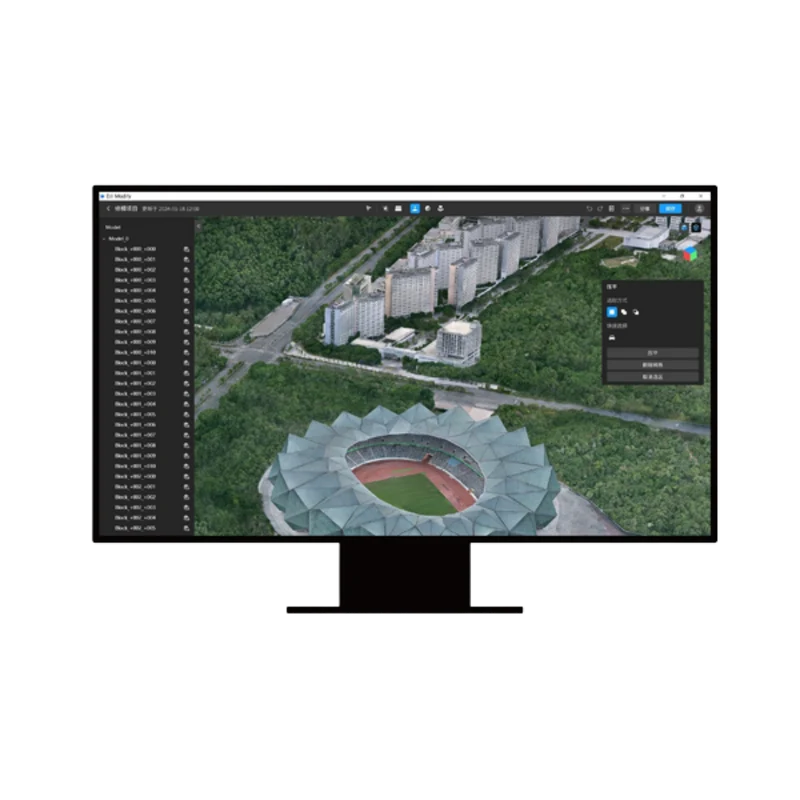
DJI Modify Flagship
DJI Modify Flagship
Couldn't load pickup availability


DJI Modify – Flagship Edition (Permanent / 1 Year)
The first DJI software dedicated to the advanced editing and cleaning of 3D models.
DJI Modify is the 3D photo editing and intelligent modeling software designed by DJI to integrate seamlessly with DJI Terra. With an intuitive interface and tools based on AI algorithms, DJI Modify eliminates the complexities of traditional 3D editing, allowing you to quickly identify and fix common defects in photogrammetric meshes and point clouds: hole filling, leveling of water surfaces, repairing missing parts, and removing vehicles or unwanted elements
Choose the License Plan that Suits You Best
DJI Modify Flagship Edition is available in two licensing options to suit every operational and budgetary requirement:
- Permanent License: A one-time purchase with an indefinite usage license. It is the ideal solution for those seeking long-term operational stability without periodic fees or renewals (includes access to software updates for the first year).
- 1 Year Subscription: A temporary license with a 12-month duration. A flexible solution that includes continuous access to the latest software updates, new features, and technical support for the entire duration of the subscription.
Why add DJI Modify to your workflow?
- Native Integration with DJI Terra: Seamless transition to DJI Modify with a single click to clean the 3D model generated in Terra, re-exporting data ready for final delivery
- AI-Powered Automatic Correction: Rapid recognition and removal of visual artifacts, such as moving cars, incorrect shadows, surface holes, or irregularities in water bodies
- Simple and Fast Editing: An interface specifically designed for surveyors and 3D modelers that does not require expertise in complex CAD or animation software.
- Batch Management and Editing: Rapid import/export and simultaneous processing for optimized management of multiple models.
Key 3D Editing Features
- Water Surface Repair: Automatically identifies and levels rivers, lakes, and water bodies, correcting the "rippled" effect typical of photogrammetric reconstructions.
- Object and Vehicle Removal: Quickly remove cars, pedestrians, or floating structures from the model with automatic reconstruction of the underlying textures.
- Hole Filling and Mesh Repair: Detects and eliminates visual gaps or shadow areas in the mesh (e.g., under roofs or bridges) by recreating the geometry naturally.
- Flattening: Levels sidewalks, yards, terrain, and building roofs with high-accuracy polygon selection tools.
- Point Cloud Editing: Smoothing, noise reduction, downsampling, and automatic classification of categories with a single click.
- Multi-format Export: Broad support for mesh compatibility (PLY, OBJ, B3DM, etc.) and point clouds (LAS, PNTS, PLY, PCD, S3MB) ready for integration into GIS systems, BIM environments, or 3D web platforms.
Industry Applications
- Engineering and Urban Planning: Photorealistic and clean presentations of construction sites, neighborhoods, and infrastructure without distracting elements.
- Architectural Surveys and Topography: Refinement of 3D models for precise technical deliveries free from geometric errors.
- Emergency Management and Security: Rapid creation of clean digital twins for scenario analysis and operational simulations.
Recommended Hardware Requirements
To ensure smooth editing of high-resolution 3D meshes and point clouds:
| Component | Minimum Requirement | Recommended Requirement (Complex Projects) |
| Operating System | Windows 10/11 64-bit | Windows 10/11 64-bit |
| Video Card (GPU) | NVIDIA (Minimum 6 GB VRAM, CUDA 6.1+) | NVIDIA RTX 3070 / 4070 (8–12 GB VRAM) |
| RAM Memory | 32 GB | 64 GB |
| Processor (CPU) | Intel Core i5 / i7 | Intel Core i7 / i9 or AMD Ryzen 7 / 9 |
| Storage | SSD with 100 GB free space | 1 TB NVMe M.2 SSD |
⚠️ Important notes:
- As with the DJI Terra suite, DJI Modify's 3D rendering and editing functions require NVIDIA graphics cards with CUDA® architecture AMD cards and integrated GPUs are not supported.
- The software requires an active Internet connection for licensing and online operation
- Each license is linked to a single DJI account and can be activated on only one workstation/device
Shipping and Warranty
Shipping and Warranty
All products available in stock will be delivered with an average timing of 24/48 hours.
Italy warranty with dedicated consulting support, contact us!